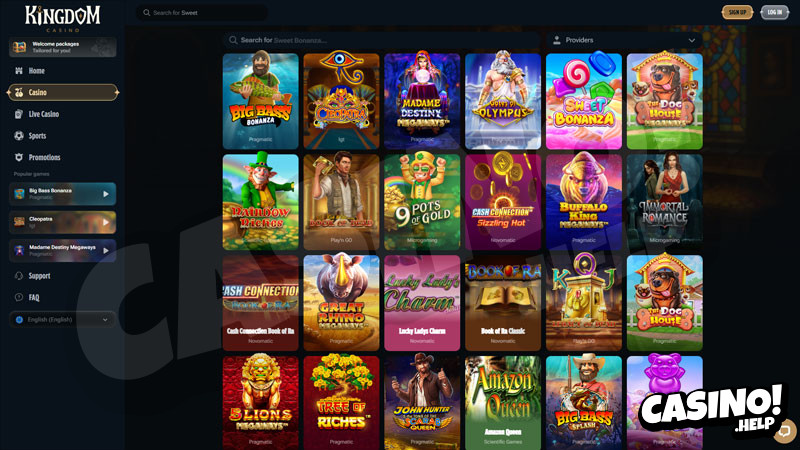
Automatic play has evolved from a simple convenience into a genuine strategic tool that changes how Canadians play with online slots. At machines à sous en ligne Casino Kingdom, the autoplay function puts control squarely in the player’s grasp, allowing a session roll along without endless manual clicks while preserving every bit of the thrill intact. The feature runs spin sequences based on specific parameters you define—number of spins, loss ceilings, or single-win caps—so your strategy holds firm whether you step away from the screen or just favor a steady rhythm. Autoplay at Casino Kingdom is not some automatic cruise-control button. It links disciplined bankroll management immediately to modern slot mechanics from major providers, which turns it one of the most underestimated tools a serious player can utilize.
How the Autoplay Feature Changes Slot Sessions
Manual spinning requires constant attention, which drains concentration during longer sessions. Autoplay takes away that hassle and allows you to settle into the game’s own tempo. At Casino Kingdom, you enable autoplay by using the settings panel beside the spin button and choosing how the engine should act. Instead of breaking the visual flow of cascading wins or bonus animations, the feature keeps the reels spinning without interruption and maintains immersion. As every bet amount and payline setup is locked in advance, the random number generator functions exactly as it does during a manual spin. The mathematical integrity of the slot remains untouched while you enjoy an uninterrupted rhythm.

Comfort aside, autoplay enhances decision-making. When a high-volatility game like Immortal Romance hits a cold cycle, manual spinning often leads to impulsive bet increases. Autoplay’s pre-set rules serve as guardrails, maintaining the original staking plan with zero emotional override. Canadian players who view slot play as a calculated entertainment expense find that autoplay converts a reactive session into a proactive one. Casino Kingdom’s interface contains every relevant control into a compact overlay, so adjustments need seconds without leaving the game screen. This feature is not about distancing yourself from the action. It’s about remaining locked into a strategy while the software takes care of the mechanical repetition.
Safe Gambling Features Built Into the Autoplay Feature
Time Tracking Notifications and Session Timers
Casino Kingdom incorporates mandatory reality check notifications that work independently of autoplay but hold extra weight during automated sessions. A popup emerges at set intervals—15, 30, or 60 minutes—indicating total session duration, net win or loss, and a choice to continue or exit. Autoplay stops until you recognize the reminder, which assures even a completely automated run cannot avoid time-awareness tools. These interruptions work as deliberate guardrails, transforming autoplay from a potential risk into a controlled activity. Canadian regulators highlight such features, and Casino Kingdom’s implementation exceeds baseline expectations by locking the autoplay slider after each reality check acknowledgement.

Deposit and Loss Threshold Management
A broader responsible gaming framework surrounds the autoplay feature. You can establish daily, weekly, or monthly deposit caps through your account, and autoplay sessions automatically follow those ceilings. If a session approaches the deposit limit, the engine ceases spinning and displays a clear message instead of allowing an overrun. Session loss limits that exist at the account level offer a second net beneath the game-level autoplay loss stop. A disciplined player might configure the slot’s loss stop at $20 while keeping a daily account loss limit of $50, creating layered protection. Casino Kingdom offers these tools in an integrated dashboard so autoplay never operates in a vacuum.
Automatické hraní and RTP: Why Payout Percentages Stay Unchanged
One enduring myth insists that autoplay in some way affects a slot’s return-to-player percentage. The fact is clear: every spin, manual or automated, invokes the same certified random number generator inside the game’s core engine. At Casino Kingdom, all slot titles from Microgaming, NetEnt, and other partners run RNG software audited by independent testing labs like eCOGRA. The autoplay layer sits completely outside that mathematical loop and works only as a trigger mechanism. ressource incontournable A game with a 96.5% RTP keeps that exact theoretical return no matter how the spin command gets issued.
Psychologically, autoplay can make volatility feel different because you watch results in rapid sequence, but the long-term odds never budge. This distinction matters for Canadian players who budget their play over weeks rather than minutes. When evaluating a slot at Casino Kingdom, your attention belongs on its paytable, hit frequency, and bonus features—never on whether autoplay is switched on. Providers design their math models independently of the interface layer, and Casino Kingdom’s platform simply exposes those models with an added convenience that respects the underlying integrity.
Configuring Autoplay: Boundaries, Loss Stops, and Win Goals
Adjusting Spin Counts and Speed
The first layer of autoplay setup at Casino Kingdom encompasses the number of spins and the gap between them. Most slots enable you select anywhere from 10 spins up to 100 or more, and you can toggle between quick spin and normal animation speeds. Quick spin shortens reel movement without affecting RNG outcomes, which appeals to players who prefer volume over visual flair. Selecting a high spin count on a low-variance game like Thunderstruck II can sustain a long, steady session, while a smaller count on a volatile release such as 9 Masks of Fire keeps the exposure deliberately short. Speed settings are a personal choice, but they influence how you perceive near-misses and win frequencies.
Sophisticated Loss and Single-Win Limits
The true muscle of autoplay manifests in the loss-limit and win-limit fields. You can instruct the engine to stop the session if total losses reach a chosen dollar amount or if a single win passes a set threshold. These hard stops eliminate the temptation to chase losses or hang around too long after a lucky streak. At Casino Kingdom, Canadian dollar accounts hold those thresholds clear—no currency mess, just straight numbers. Here’s a practical setup:
- Spin count: 50 spins at $0.50 per spin.
- Loss threshold: stop if total loss reaches $15.00.
- Single-win stop: stop if any single round pays $25.00 or more.
This kind of configuration locks in a maximum downside while automatically safeguarding a meaningful upside. Players who stack these rules essentially create a mini-session that honors their bankroll boundaries without needing constant oversight.
Leading Casino Kingdom Slot Developers That Master Autoplay
Microgaming’s Seamless Integration
As a foundational provider, Microgaming embeds autoplay directly into classics like Mega Moolah and Break da Bank Again with a consistent control bar. The interface offers instant access to spin counts, fast-play toggles, and bonus-round behavior settings. Microgaming slots often enable you decide whether autoplay should stop when a feature triggers, giving you manual control during free spins while automating base-game grinds. This hybrid approach works especially well on progressive jackpot titles where a bonus round arrival requires full attention. Casino Kingdom’s library contains an extensive collection of Microgaming titles that utilize this balanced balance between automation and player agency.
NetEnt’s Spin Button Innovation
NetEnt handles autoplay with a sleek sidebar that includes an improved “stop on any win” option alongside conventional loss limits. Games like Starburst and Dead or Alive 2 benefit from this detail because win frequency on a low-volatility grid can be elevated enough that pausing manually becomes tiresome. The provider also places a session-hand history inside the autoplay panel, so you can easily check win percentages without exiting the game. For Canadian players who appreciate data transparency, this small addition converts autoplay into a light analytics tool while ensuring spins flowing efficiently on Casino Kingdom’s platform.
Pragmatic Play and Quick Spin Choices
Pragmatic Play pushes autoplay speed further with its turbo spin feature, available on hits like Wolf Gold and Sweet Bonanza. Combined with a quick-spin toggle, turbo mode cuts animation lag aggressively and facilitates high-volume play tailored to bonus-hunting strategies. Casino Kingdom offers a increasing selection of Pragmatic Play slots where the autoplay panel also remembers your last-used settings across sessions. That memory function removes excess setup and allows a returning player get straight into a pre-configured run. The combination of memory, turbo speed, and sensible loss caps builds a customized experience that competitive Canadian slot enthusiasts enjoy.
Slot Volatility and Autoplay Strategy: High and Low Variance Options
High Variance Grind with Autoplay Brakes
High-volatility slots like Book of Dead or 9 Pots of Gold offer scarce but significant wins, and autoplay demands different adjustments for them. A player aiming for a bonus round should set a tight loss limit relative to the bankroll because long dry spells are statistically typical. For instance, on a $100 session budget, establishing a loss cap at $40 and a spin count of 75 cuts the bleeding early while still offering the game a reasonable try. Casino Kingdom’s autoplay panel enables pairing a generous spin count with a firm financial stop easy. The trick is fighting the impulse to extend the spin count mid-session; the pre-set numbers become the backbone of your strategy.
Low Variance Consistent Yield
Low-volatility games pump out frequent small wins, so autoplay settings can lean toward endurance. A slot like Aloha! Cluster Pays or Thunderstruck II can smoothly execute 100 spins with a reasonable loss cap because the hit frequency preserves balance stability. Players often turn off the single-win stop entirely on such titles since massive payouts are rare and the true worth sits in accumulated drip-feed returns. At Casino Kingdom, combining a high spin count with a loss limit roughly 30-40% of the session bankroll transforms low-volatility autoplay into a long haul rather than a sprint. The consistency suits Canadian players who view slots as an evening relaxation rather than a high-adrenaline chase.
Game Mechanics That Shine Brighter with Autoplay
Tumbling Reels and Multiplier Builds
Tumbling mechanics—where winning symbols disappear and fresh ones drop in—gain a ton from an steady spin cadence. Autoplay on titles like Gonzo’s Quest or Bonanza maintains the avalanche rolling so consecutive win multipliers accumulate without the delay of manual clicks. Each cascade activates a new evaluation instantly, and the momentum feels organic rather than fragmented. At Casino Kingdom, players who switch on autoplay for cascading slots often observe the feature sequence is more fluid, letting the game’s mathematical rhythm—multiple wins from a single paid spin—demonstrate its full potential without artificial breaks.
Free Round Triggers and Auto-Retrigger Logic
Many modern slots immediately kick off free spin rounds when scatter symbols land, but autoplay settings control what happens next. Some games let autoplay to keep running inside the bonus round, while others pause so you can choose a volatility mode or gamble feature. Casino Kingdom’s slot catalog includes games where retriggering free spins during autoplay is effortless—the counter simply adds fresh spins and the engine continues. Players who chase retriggers on games like Immortal Romance’s Chamber of Spins discover that autoplay preserves the statistical flow, turning a feature that might appear laborious manually into a fluid, watchable event.
Mobile Autoplay: Single-Tap Control for Canadian Players
Handheld slot play across Canada requires efficiency, and autoplay on Casino Kingdom’s touch-optimized platform offers exactly that. Instead of constant tapping that causes screen fatigue, you access the autoplay panel with a one tap, set constraints, and let the game progress while the device rests on a table or stand. The interface adapts to smaller screens by streamlining settings into scrollable menus that never crowd the reels. Both iOS and Android sessions get identical autoplay logic, so a player who sets up limits on desktop can replicate the same guardrails on mobile without missing a beat.
Touch-Friendly Interfaces on iOS and Android
Casino Kingdom’s mobile lobby considers how https://www.reddit.com/r/arizona/comments/13hrioc/best_largest_buffets_in_all_of_arizona/ Canadians actually hold their phones. Autoplay controls sit within thumb reach at the bottom edge of the screen, and the start/stop button is large enough to avoid mis-taps. Quick-spin toggles, loss-limit input fields, and win-ceiling sliders all scale responsively. On compatible devices, the platform includes haptic feedback so you experience a subtle vibration when a loss limit gets triggered—a small detail that reinforces awareness without demanding constant visual monitoring. The entire design philosophy ensures that autoplay on mobile doesn’t feel like a squeezed-down desktop feature. It’s a reimagined tool built for one-handed use during a commute or a quick break.
Choosing the Ideal Autoplay Slot at Casino Kingdom
Choosing a slot for autoplay at Casino Kingdom goes beyond visual themes. The decision should rest on three concrete factors: validated RTP percentages over 96%, a provider renowned for stable autoplay integration, and volatility that matches your risk temperament. The platform’s filter tools enable you to filter by provider, and each game page transparently presents RTP data and feature descriptions. A effective selection process may follow these steps:
- Filter by provider—start with Microgaming or NetEnt for tested autoplay interfaces.
- Check the paytable for bonus mechanics that function effectively with automation, such as cascading reels or locked wilds.
- Ensure the autoplay panel features both loss and single-win stop fields, not just a spin counter.
- Perform five manual spins first to evaluate hit frequency, then activate autoplay with conservative limits.
- Adjust speed to quick or normal depending on how much session data you want to observe.
Once configured, the autoplay feature becomes a personal engine that operates the slot following a script you write. Casino Kingdom provides Canadians all the essential levers—stop losses, reality checks, speed toggles, and provider diversity—so autoplay functions as a precision tool, not a gamble stacked on top of a gamble.